Decision Method
Decision Matrix for Teams
Compare options objectively using weighted criteria. Score each option, apply importance weights, and see which one actually wins when you stop guessing.
Last updated: April 2026
What is a Decision Matrix?
A Decision Matrix is a method for comparing multiple options against weighted criteria. Options go in the rows, criteria in the columns. Each criterion gets an importance weight, each option gets a score per criterion, and the sum of weight times score ranks the options objectively. It makes trade-offs explicit instead of intuitive.
The real value is not the math. It is that the matrix makes trade-offs explicit. When one option is cheaper but slower, the matrix forces the team to decide how much each factor actually matters before scoring any options. This separates the "what matters" conversation from the "which option wins" conversation, which is critical because teams who skip this step end up adjusting weights until their preferred option wins, which defeats the entire purpose.
In German-speaking countries, the same approach is known as Nutzwertanalyse (utility value analysis), formalized by Christof Zangemeister in "Nutzwertanalyse in der Systemtechnik" (1970). Decision matrices are standard in engineering, product management, vendor selection, and business strategy. They are referenced in project management standards (PMBOK, PRINCE2) and engineering guidelines (VDI 2225 for criteria weighting).
When to use a Decision Matrix
- You have 3 or more options and need to compare them systematically rather than relying on gut feeling
- Multiple criteria matter but with different levels of importance, and the team needs to agree on what matters most before evaluating
- The team disagrees on priorities and needs an objective framework that separates weighting from scoring
- You want to reduce bias by preventing people from adjusting criteria to fit their preferred option
- The decision has significant impact and needs to be defensible to stakeholders, auditors, or leadership
- You need to document the rationale for a vendor selection, technology choice, or strategic decision
Step-by-step guide
- 1
Define your criteria
List the factors that matter for this decision. Start by brainstorming broadly, then consolidate to 5-8 criteria. More than 10 dilutes the signal because each additional criterion reduces the weight of every other one. Test each criterion: "Would changing the score on this criterion change which option wins?" If no, it is not a real decision factor. Good criteria examples: implementation speed, total cost of ownership, API integration depth, vendor support quality, scalability.
- 2
Assign weights before seeing any options
Give each criterion a weight (1-5 or percentage) based on its importance. The critical rule: set weights before you know how the options score. If you set weights after scoring, you will unconsciously adjust them until your preferred option wins. For more objective weights, use the Pairwise Comparison tool, which derives weights from head-to-head comparisons instead of guessing. A criterion weighted 5 has five times the influence on the result as one weighted 1.
- 3
Score each option independently
Rate each option on each criterion (1-5). Be consistent: define what each score means before you start. 1 = does not meet the requirement. 3 = meets the requirement adequately. 5 = exceeds the requirement significantly. Score each option independently. Don't compare scores between options while rating. Focus on how well THIS option meets THIS criterion. Cross-comparison introduces anchoring bias.
- 4
Review the weighted totals
The tool multiplies each score by its weight and sums the results per option. The option with the highest weighted total is the mathematical best choice. But don't stop at the number. Review the breakdown: where did the winner score highest? Where did it score lowest? A winner that scores 5 on "cost" but 1 on "scalability" might be a short-term win but a long-term liability. The matrix reveals this.
- 5
Handle close results thoughtfully
When two options score within 5% of each other, the matrix is telling you both are viable. At that point, chasing a numerical difference is false precision. Look at qualitative factors: which option is easier to reverse? Which vendor is easier to work with? Which has less execution risk? Close scores mean the criteria don't strongly differentiate. Either option is defensible.
Pro tip: Set criteria and weights BEFORE looking at options. This is the most important rule. If you set weights after you know how the options score, you will unconsciously (or consciously) adjust them until the option you already prefer wins. This defeats the purpose. Lock the weights first, then score.
Pro tip: Use the Pairwise Comparison tool to derive weights objectively. Instead of guessing "cost is about 30% important," the pairwise comparison asks you to compare criteria head-to-head and derives weights from your choices. This produces weights that reflect actual priorities, which often differ from stated priorities.
Pro tip: When two options score within 5% of each other, stop chasing the number. The matrix is telling you both options are viable by the criteria you defined. At that point, look at qualitative factors: reversibility, vendor relationship, execution risk. Close scores mean the structured evaluation cannot differentiate them. Pick based on what the numbers don't capture.
Pro tip: Have multiple stakeholders score independently before comparing. When one person scores all options, their biases apply uniformly. When four people score independently, individual biases cancel out and systematic patterns emerge. "Everyone scored LogiStack low on multi-site support" is a stronger signal than one person's rating.
Example
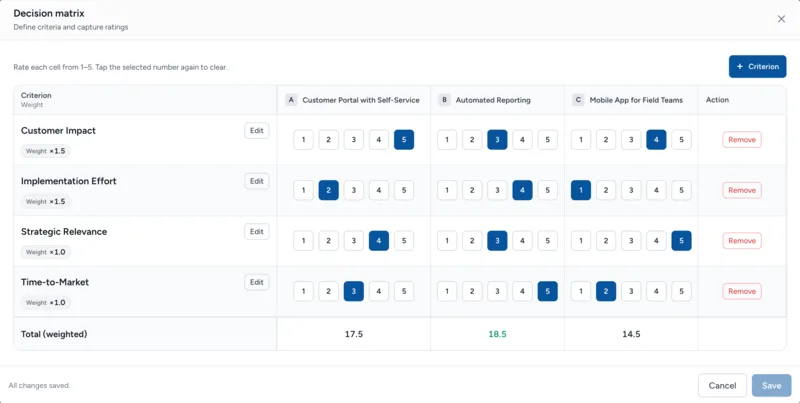
A product team is evaluating three initiatives for the next quarter. (Fictional example for illustration.)
| Criterion | Weight | Customer Portal | Automated Reporting | Mobile App |
|---|---|---|---|---|
| Customer Impact | 1.5 | 5 | 3 | 4 |
| Implementation Effort | 1.5 | 2 | 4 | 1 |
| Strategic Relevance | 1 | 4 | 3 | 5 |
| Time-to-Market | 1 | 3 | 5 | 2 |
| Weighted Total | 17.5 | 18.5 | 14.5 |
Worked Example
A logistics company with 80 employees is evaluating three warehouse management systems (WMS) for their European distribution network. The operations team ran a Decision Matrix with criteria weights derived from a pairwise comparison conducted the previous week.
| Criterion | Weight | WMS Pro | LogiStack | FlexWare |
|---|---|---|---|---|
| Implementation speed | 5 | 3 (15) | 5 (25) | 4 (20) |
| API integration depth | 4 | 5 (20) | 3 (12) | 4 (16) |
| Multi-site support | 4 | 4 (16) | 3 (12) | 5 (20) |
| Total cost of ownership | 3 | 4 (12) | 5 (15) | 3 (9) |
| Vendor support quality | 2 | 3 (6) | 4 (8) | 5 (10) |
| Weighted Total | 69 | 72 | 75 |
FlexWare won with 75 points, ahead of LogiStack (72) and WMS Pro (69). Implementation speed carried the heaviest weight, and LogiStack was fastest, but its weaker API integration depth would have required manual workarounds later. FlexWare's balance across multi-site support (5/5) and vendor quality (5/5) outweighed its shorter lead in any single criterion. Without the matrix, the team had originally favored LogiStack because of its lower upfront cost; the structured scoring surfaced what the price tag alone hid.
Decision Matrix vs Pro/Con List
| Dimension | Decision Matrix | Pro/Con List |
|---|---|---|
| Input | Criteria with weights, scores (1-5) per option | Arguments for and against each option |
| Output | Quantitative ranking with weighted totals | Qualitative comparison |
| Handles importance | Yes (criteria weights define importance) | No (all arguments treated equally) |
| Number of options | 3+ options compared side by side | Best for 2-3 options |
| Defensibility | High (numbers, weights, documented rationale) | Low (subjective, depends on who's in the room) |
| Time required | 45-90 minutes | 15-30 minutes |
Start with a Pro/Con list for a quick gut check. If the decision turns out to involve multiple criteria with different importance levels, or if stakeholders need a quantified rationale, upgrade to a Decision Matrix. The Pro/Con often serves as raw material: your arguments become the criteria, and "how much does this argument matter?" becomes the weight.
Common Mistakes
1 Using too many criteria
More than 8-10 criteria dilutes the signal. Each additional criterion reduces the weight of every other one. With 15 criteria, even important factors have tiny weights and barely influence the outcome. Focus on the 5-8 factors that would actually change your decision. Test: "If I removed this criterion, would the ranking change?" If no, it's not pulling its weight.
2 Reverse-engineering weights to justify a preference
If you already know which option you want and adjust the weights until it wins, you've turned an objective tool into a confirmation bias machine. The fix: set weights before seeing any options, ideally using pairwise comparison. If a stakeholder suggests changing weights after seeing results, that's a red flag. Ask: "Would you have suggested this weight change before seeing the scores?"
3 Overweighting what is easy to measure
Cost and speed are easy to score. Team morale, technical debt, brand impact, and cultural fit are harder. If the matrix only contains measurable factors, it biases the result toward the most quantifiable option, not the best one. Include hard-to-measure criteria and estimate scores. An imperfect 3 or 4 rating on "cultural fit" is better than ignoring cultural fit entirely.
4 Ignoring close results
When two options score 73 and 75, the matrix is not telling you FlexWare is clearly better. It's telling you both options are viable by these criteria. Presenting a 2.7% difference as a definitive winner is false precision. Discuss the qualitative differences, reversibility, and execution risk. Close scores require judgment, not more decimal places.
How to use the Decision Matrix in DecTrack
- 1Create a decision in DecTrack, add the options, and define your criteria with their weights. Score each option against the criteria on a 1-to-5 scale. DecTrack calculates the weighted totals automatically and highlights the top-scoring option.
- 2Invite the team to vote anonymously so each member produces their own scores for every option. If scores diverge sharply, use the discussion to surface which assumptions differ before confirming the decision.
Try the free interactive tool
Use this method right now in your browser. No signup required, with PDF export.
Frequently asked questions
- Start with the factors that would make you choose one option over another. If price doesn't matter, don't include it. If time-to-market is critical, include it with a high weight. The criteria should reflect what actually drives this decision.
- If the weighted totals are within 5-10% of each other, the matrix is telling you both options are roughly equal on your stated criteria. Look at the individual criterion scores to find the key differentiator, or consider adding a tiebreaker criterion.
- In DecTrack, weights are set once for the decision (typically by the decision owner). This ensures everyone is scoring against the same priorities. If the team disagrees on weights, discuss and align on them before scoring.
- 4-7 criteria is the sweet spot. Fewer than 4 means the comparison is too shallow. More than 7 makes scoring tedious and dilutes the importance of each factor. Focus on the criteria that actually differentiate the options.
- Yes, it's one of the best methods for remote teams. The structured scoring creates an objective basis for discussion. Share the decision with your team and collect feedback via the discussion channel, even across time zones.
Related from the blog
Related methods
Pro/Con Analysis
List arguments for and against each option to create a clear basis for discussion. Ideal when the decision is qualitative and you want the whole team involved.
SWOT Analysis
Systematically evaluate Strengths, Weaknesses, Opportunities, and Threats for each option. Gives you the full picture before you commit.
Impact/Effort Matrix
Rate each option by impact and effort to find quick wins and stop wasting resources on low-value work.